tasque: linux上的RTM客户端

RTM, remember the milk是现在比较流行的在线待做事宜网站之一,如果你正好在使用RTM, 而又不喜欢老是用浏览器登录的话,tasque就是一个不错的选择。当然,tasque也可以用来使用本地的文件,或者Evolution Data Server。

tasque,读做task,两位作者在他们的某周时间内使用C#进行了快速开发,作为todo list管理的前端, 效果还是不错的。更多后端服务正在添加之中。

如果使用RTM作为后端服务器的话,它会让你登录到RTM,在其中允许tasque进行访问。然后就可以在本地管理待做事宜了. 因为相当于一个网络终端,同步可能需要一些时间。

截图: tasque
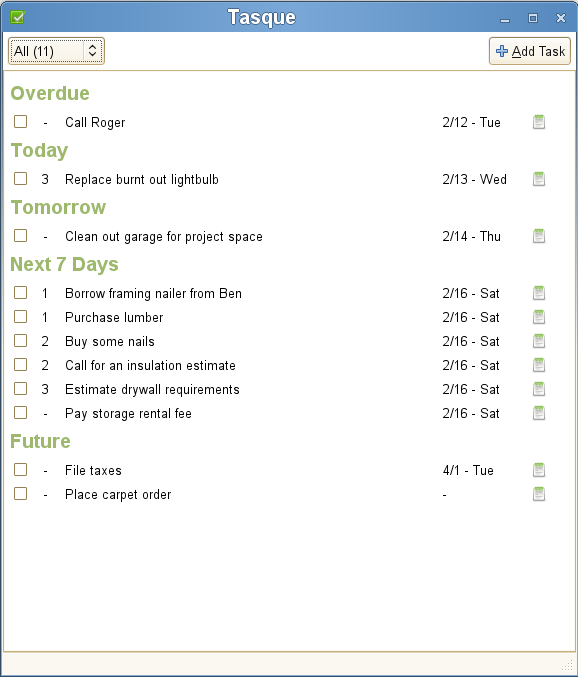
如何在Ubuntu 8.04中安装? 将

deb http://ppa.launchpad.net/tasque-packagers/ubuntu hardy main
加入source.list即可。 源代码安装见

详情请看tasque@live.gnome.org

Read More:

  • No related posts

13 Comments

  1. 1 DS Commented @ 2008-09-14 13:00Reply to this comment

    最近网站总是出现 503 服务不可用,负载过大还是 WP 的问题?

  2. 2 Toy Commented @ 2008-09-14 13:36Reply to this comment

    @DS:负载过大造成的。目前采取了一些措施,不过效果不明显。欢迎大家提供良方。先行谢过。

  3. 3 weakish Commented @ 2008-09-14 15:42Reply to this comment

    taskque不僅可作為remeber the milk的前端,還可以脫離其單獨/離線使用。

  4. 4 DS Commented @ 2008-09-14 15:55Reply to this comment

    @Toy 不知是否使用了缓存插件?这通常能减轻网站压力。

    没看走眼的话这个网站是 Wordpress 做的吧?

  5. 5 雪梨 Commented @ 2008-09-14 17:08Reply to this comment

    @Toy: httpd 前加个缓冲加速器吧(varnish 比 squid 加速效果好很多)

    或者, httpd 换成 lighttpd/nginx + fcgi + php5-cli

  6. 6 雪梨 Commented @ 2008-09-14 17:10Reply to this comment

    现在 linuxtoy.org 是

    Cache-Control: no-store, no-cache, must-revalidate, post-check=0, pre-check=0

  7. 7 Toy Commented @ 2008-09-14 18:21Reply to this comment

    @DS:是 WP,有用缓存插件。

    @雪梨:谢谢建议。

  8. 8 motse Commented @ 2008-09-14 18:53Reply to this comment

    toy可以试试,nginx,可以有效提高负载能力。

  9. 9 motse Commented @ 2008-09-14 18:56Reply to this comment

    对了,我把你站点的一些内容推荐到了这里 http://www.opzn.com/news/tech.shtml 注了来源,不知道是否有版权方面的问题?

  10. 10 dream Commented @ 2008-09-15 1:56Reply to this comment

    哈哈,这个软件的作者我认识~~ :)

  11. 11 dream Commented @ 2008-09-15 1:57Reply to this comment

    哈哈,这个软件的作者我认识~~ 没想到他们写的软件在toy能公布 :)

  12. 12 skh Commented @ 2008-09-15 10:01Reply to this comment

    感觉不如直接上网站+google gear

  13. 13 yaoshuyan Commented @ 2009-03-04 11:57Reply to this comment

    为什么我用tasque,给一个task加note死活也添加不上呢?我用的是local file
