Manpages 彩色版

Manpages 为手册页之意,在 Linux 中,若你遇到问题,可通过 man 指令即时查询这些 Manpages 以获取帮助。Nico Golde 介绍的方法很有意思,它可让我们平时司空见惯的 Manpages 一下子变得充满色彩起来。这个彩色版本的 Manpages 读起来令人感觉更加醒目。
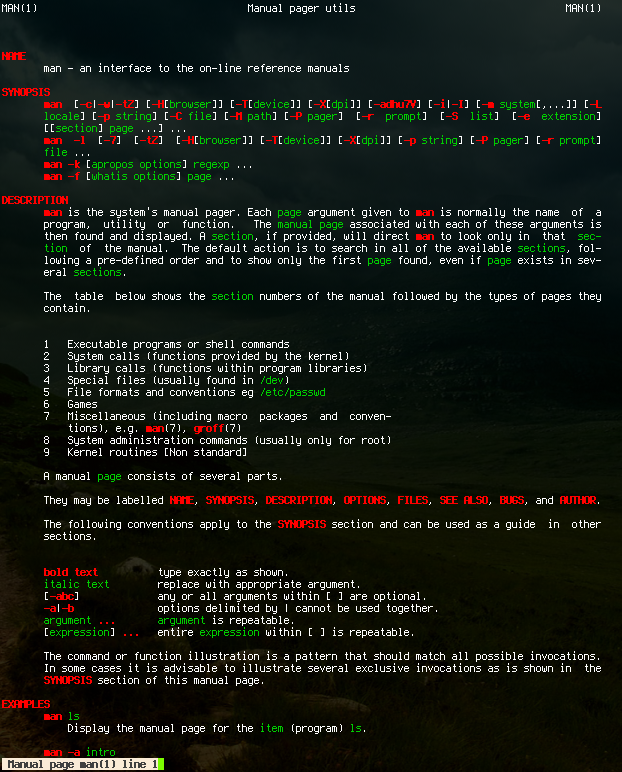
Man Manpages 彩色版

要实现这个彩色版的 Manpages 并不难,只需按以下步骤执行即可:

  1. 在你的主目录创建 .terminfo 目录,并转到该目录:mkdir ~/.terminfo/ && cd ~/.terminfo
  2. 从作者网站获取 terminfo 描述文件:wget http://nion.modprobe.de/mostlike.txt
  3. 使用 tic 命令编译 mostlike.txt 文件(编译后可删除):tic mostlike.txt
  4. 定义别名:alias man="TERMINFO=~/.terminfo/ LESS=C TERM=mostlike PAGER=less man"

现在使用 man 指令就可以读到彩色版的 Manpages 了。如果你需要修改 terminfo 文件,则可以使用 infocmp mostlike

[via]

Read More:

11 Comments

  1. 1 风雷 Commented @ 2007-06-24 22:59Reply to this comment

    恩,这个挺有意思的

  2. 2 davix Commented @ 2007-06-24 23:15Reply to this comment

    不错,多谢toy的介绍,明天试试

  3. 3 Border Commented @ 2007-06-25 0:27Reply to this comment

    有空了就去试试。Thanks

  4. 4 nacre Commented @ 2007-06-25 1:38Reply to this comment

    不用这么麻烦的,在~/.bashrc里添加如下内容就可以了:

    For colourful man pages (CLUG-Wiki style)

    export LESSTERMCAPmb=$'\E[01;31m' export LESSTERMCAPmd=$'\E[01;31m' export LESSTERMCAPme=$'\E[0m' export LESSTERMCAPse=$'\E[0m' export LESSTERMCAPso=$'\E[01;44;33m' export LESSTERMCAPue=$'\E[0m' export LESSTERMCAPus=$'\E[01;32m'

  5. 5 xul Commented @ 2007-06-25 3:31Reply to this comment

    nacre 的方法不错。

  6. 6 roylez Commented @ 2007-06-25 10:08Reply to this comment

    Haven't you guys tried rxvt?

  7. 7 xwl Commented @ 2007-06-25 12:27Reply to this comment

    真的想用的话,还不如直接上 most...

    $ PAGER=most man ls

  8. 8 Toy Commented @ 2007-06-25 19:43Reply to this comment

    @nacre, xwl:谢谢。

  9. 9 ytao Commented @ 2007-06-26 18:52Reply to this comment

    真不错呀!不但看上去是彩色,而且我的man可以使用上下键查看了,不知道是不是也是因为这个缘故。

  10. 10 freenight Commented @ 2009-03-18 2:43Reply to this comment

    alias man='man -P most' man yes

  11. 11 billy Commented @ 2010-01-24 18:26Reply to this comment

    @xw1: 谢谢,学习
