小技巧: 如何将 Gmail 设置为默认的邮件客户端

对于日常使用 Gmail 的朋友来说,这是一个十分有用的小技巧。该技巧将引导你如何在 Linux 中将 Gmail 设置为默认的电子邮件客户端。通过这样设置之后,的确能够给我们使用 Gmail 带来方便。比如,点击电子邮件地址就会直接进入 Gmail 的撰写邮件界面。
Gmail setting

  1. 你需要创建具有如下内容的 shell 脚本: #!/bin/sh firefox https://mail.google.com/mail?view=cm&tf=0&to=`echo $1 | sed 's/mailto://'` 如果你想要在现有 Firefox 窗口的新标签中打开,则替换为下面的内容: firefox -remote "openurl(https://mail.google.com/mail?view=cm&tf=0&to=`echo $1 | sed 's/mailto://'`,new-tab)"
  2. 将该脚本保存为 open_mailto.sh,并加上可执行权限: chmod u+x ~/open_mailto.sh
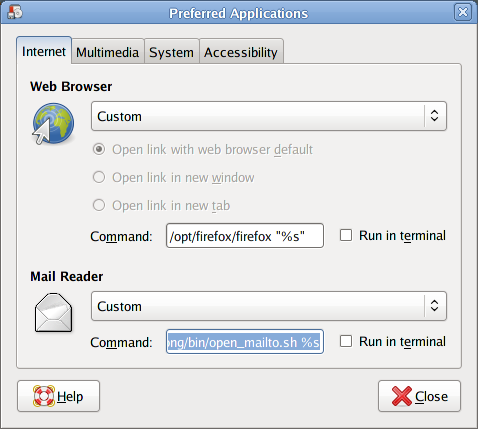
  3. 点击 System → Preferences → Preferred Applications,在 Mail Reader 下选择 Custom,并在 Command 右边输入 /home/username/open_mailto.sh %s。注意,你需要将其中的 username 换成自己的。

[via]

Read More:

7 Comments

  1. 1 max Commented @ 2007-11-23 11:50Reply to this comment

    good

  2. 2 siugat Commented @ 2007-11-23 12:27Reply to this comment

    Very good.

  3. 3 TTG Commented @ 2007-11-23 12:27Reply to this comment

    似乎装了googlesearchbar的扩展,也可以有同样的效果。

  4. 4 fengluo Commented @ 2007-11-23 13:44Reply to this comment

    很有用啊 试试!

  5. 5 Peng Commented @ 2007-11-23 15:51Reply to this comment

    原贴评论里提到一个更合理的做法:用gnome-open代替firefox命令,这样关于用哪个浏览器、是否在新标签里打开页面,全可以在System->Preferences->Preferred Applications里设置了。

  6. 6 iveney Commented @ 2007-11-23 22:52Reply to this comment

    这个想法很聪明,谢谢。

  7. 7 joe jiang Commented @ 2009-04-01 23:33Reply to this comment

    sudo apt-get install libpar-packer-perl

    sudo pp -e 'exec qq{firefox --remote "openurl(https://mail.google.com/mail?view=cm&tf=0&to=@{[join q(,), map {s/^mailto://;$_} @ARGV]})"}' -o /usr/local/bin/gmail

    然后设置 gmail 为 Preferred Email Applications 也可以