小技巧: 在 GNOME 桌面中快速打开文件夹

通常我们在 GNOME 桌面环境中打开文件夹都是通过先启动文件管理器,再导航到目标文件夹来完成的。实际上,你可以在无窗口或聚焦到桌面的情况下按 / 键,然后在“打开位置”对话框中输入欲打开的文件夹路径并回车即可。这将调用 Nautilus 来打开该文件夹。不用担心输入长名称,它会帮你自动补完。
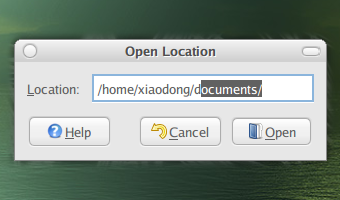
Open Location

感谢 FOSSwire 贡献这个实用的小技巧。

Read More:

19 Comments

  1. 1 leixinren Commented @ 2007-12-07 10:49Reply to this comment

    CTRL+L也可以,默认是打开home目录。

  2. 2 eagle Commented @ 2007-12-07 11:03Reply to this comment

    这个不错、。

  3. 3 bluebanboom Commented @ 2007-12-07 11:09Reply to this comment

    mark学习了。呵呵。

  4. 4 kwyd Commented @ 2007-12-07 11:36Reply to this comment

    useful tips!!!

  5. 5 fanhe Commented @ 2007-12-07 11:42Reply to this comment

    这个我居然一直都不知道的说

  6. 6 ahtya Commented @ 2007-12-07 12:44Reply to this comment

    长见识了

  7. 7 gordonyb0 Commented @ 2007-12-07 13:08Reply to this comment

    非常实用

  8. 8 52abc Commented @ 2007-12-07 14:28Reply to this comment

    Ctrl+H显示隐藏文件。

  9. 9 内存不足 Commented @ 2007-12-07 20:31Reply to this comment

    可以在Firefox里实验一下 / 的作用 呵呵

  10. 10 eagle Commented @ 2007-12-07 22:02Reply to this comment

    @内存不足

    要装扩展的吧。

  11. 11 DBLobster Commented @ 2007-12-07 22:03Reply to this comment

    丫。。。真不错~

  12. 12 ivan Commented @ 2007-12-08 9:00Reply to this comment

    alt+f2里输路径也是可以的,效果一样

  13. 13 garnettxd Commented @ 2007-12-08 14:28Reply to this comment

    别说,我还真不知道,多谢多谢。

  14. 14 latteye Commented @ 2007-12-08 22:45Reply to this comment

    直接运行 nautilus 就可以打开 Home 了。 把 nautilus 定义到一个快捷键就可以很快捷的打开 Home 目录。

    nautilus 后面跟路径就可以很快打开对应的文件夹。

  15. 15 somebody(莫多) Commented @ 2007-12-10 13:42Reply to this comment

    觉得还是alt+f2比较好。ctrl+l至少要在 show desktop的时候才能用。alt+f2是全局的。这个好用。

  16. 16 owl Commented @ 2007-12-11 14:01Reply to this comment

    我也不知道

  17. 17 iseu Commented @ 2008-05-03 9:59Reply to this comment

    中文好像不能自动补全。

  18. 18 vlinux Commented @ 2008-08-24 2:54Reply to this comment

    直接输入~/就转到home了

  19. 19 bingmou Commented @ 2008-12-24 16:04Reply to this comment

    其实我觉得最好的的gnome-open,在终端有时候到了某个文件夹想要打开,如果把gnome-open命名为go就只需要 $go . 然后就打开了
