Pearl Crescent Page Saver:将网页捕获为图片

一直在寻找好用的将网页捕获为图片的工具,之前有用过 Screengrab!,但它依赖 Java,颇让人有点遗憾。现在,我确信,Pearl Crescent Page Saver(以下简称 PCPS)将成为我新的选择。
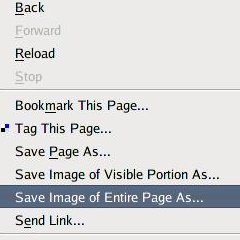
Pearl Crescent Page Saver

PCPS 与 Screengrab! 一样,都是 Firefox 的扩展。目前,PCPS 具有两种捕获的方式:一是将网页的可见部分捕获为图片;二是把整个网页捕获成图片。PCPS 可以将所捕获的图片保存为 PNG 或 JPEG 图片格式。PCPS 的其他功能还包括:可以定制热键、文件名、以及图片尺寸等。
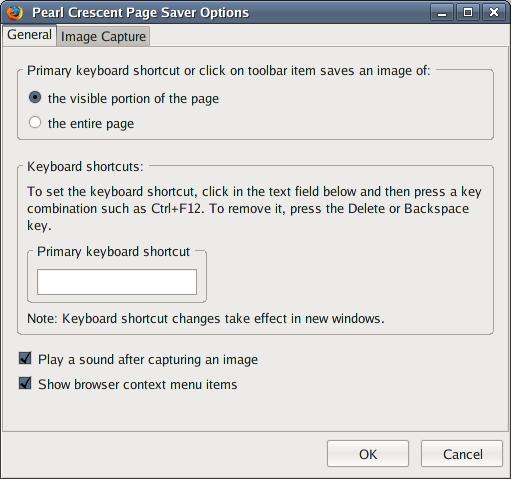
Pearl Crescent Page Saver

PCPS 有两个版本:Basic 版和 Pro 版。后者比前者的功能要多一些,不过需要付费。对于一般用户来说,使用 Basic 版足矣。PCPS 可用于 Firefox 1.5 - 2.0 版本,你能够从这里安装它

[via]

Read More:

13 Comments

  1. 1 ASheepErin Commented @ 2007-07-28 11:25Reply to this comment

    我觉得Save as Image就不错,是FF的一个Add-on,Toy可以试试看

  2. 2 Toy Commented @ 2007-07-28 12:01Reply to this comment

    @ASheepErin:谢谢你的推荐。

  3. 3 zhuqin Commented @ 2007-07-28 12:19Reply to this comment

    功能和screengrab save as image没什么区别。 screengrab已经基于gecko canvas了,实在没必要用这个nonfree的东西。

  4. 4 noxide Commented @ 2007-07-28 16:36Reply to this comment

    good!

  5. 5 ahui Commented @ 2007-07-28 16:47Reply to this comment

    toy 有没有好用的屏幕取色工具推荐一个,不要firefox的插件

  6. 6 Toy Commented @ 2007-07-28 17:14Reply to this comment

    @ahui:你可以试试 gcolor2Color picker

  7. 7 ahui Commented @ 2007-07-28 23:19Reply to this comment

    toy ,谢谢你的推荐,但是我试着通过以下步骤编译安装了color picker ./configure make sudo make install 在/usr/local/bin/下找到了colorapplet.py 并通过./colorapplet.py运行它,可是没有反应。不知道是编译安装过程中有问题,还是启动方法错误。(运行make命令时有点可疑,好像没作什么工作, Making all in src make[1]: Entering directory /home/wu9506/colorapplet-1.0/src' make[1]: Nothing to be done forall'. make[1]: Leaving directory /home/wu9506/colorapplet-1.0/src' Making all in servers make[1]: Entering directory/home/wu9506/colorapplet-1.0/servers' make[1]: Nothing to be done for all'. make[1]: Leaving directory/home/wu9506/colorapplet-1.0/servers' make[1]: Entering directory /home/wu9506/colorapplet-1.0' make[1]: Nothing to be done forall-am'. make[1]: Leaving directory `/home/wu9506/colorapplet-1.0' )

  8. 8 Toy Commented @ 2007-07-29 8:45Reply to this comment

    @ahui:这个是要添加到 GNOME 面板中才能使用的。

  9. 9 ahui Commented @ 2007-07-29 11:49Reply to this comment

    toy,请问要怎么添加呢? 安装完后我在“添加到面板“这个应用中一直找不到相关选项

  10. 10 Toy Commented @ 2007-07-29 12:07Reply to this comment

    @ahui:在“Utilities”中添加,见图

  11. 11 ahui Commented @ 2007-07-29 12:29Reply to this comment

    toy:在“Utilities"中找不到color applet 选项,不知道是什么原因,有点要抓狂了

  12. 12 Toy Commented @ 2007-07-29 12:35Reply to this comment

    @ahui:那你执行下面几步: 1 sudo make uninstall 2 ./configure --prefix=/usr 3 sudo make install

  13. 13 ahui Commented @ 2007-07-29 12:52Reply to this comment

    toy:谢谢了!!可以了,难道是lib库指向的问题?
