LinuxTOY 是一个致力于提供 Linux 相关资讯的专题站点。如果您发现了好用好玩的 Linux 东东并愿意发扬自由、分享的精神,可以点击顶部导航 Contact 按钮进行投稿。

Related entries

Grandr Applet — 更改屏幕分辨率的 GNOME 面板程序

Grandr Applet 是一个可以让你直接通过 GNOME 面板来即时更改当前屏幕分辨率及方向的小工具。在安装后,你能够从”添加到面板“窗口的工具部分找到它──Display Geometry Switcher。
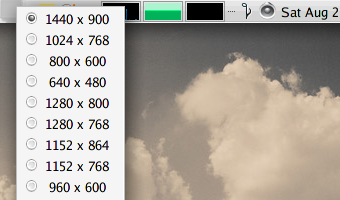
Grandr

- Download Grandr Applet 0.3 (source)
- Download Grandr Applet 0.3 (rpm)
- Download Grandr Applet 0.3 (deb)

署名 • 注明出处 • 非商业性使用

5 Comments

  1. 1 Colin Commented @ 2007-08-25 1:49 pmReply to this comment

    请教一下,我的分辨率里只的1280×1024, 1024×768, 800×600, 640×480,但却找不到我想要的1154×864, /etc/X11/xorg.conf 已经有这个值了.

  2. 2 Evan Commented @ 2007-08-25 4:10 pmReply to this comment

    @Colin 在xorg.conf上添加你要的值不就可以了吗?

  3. 3 Jimmin Commented @ 2007-08-25 10:34 pmReply to this comment

    貌似没什么用?难道有人经常更改分辨率?

  4. 4 wjs272 Commented @ 2007-08-25 11:25 pmReply to this comment

    楼上说得有道理

  5. 5 Colin Commented @ 2007-08-25 11:30 pmReply to this comment

    @Evan 我的/etc/X11/xorg.conf 已经有这个值了,但设置“屏幕分辨率”的时候没有得让我选。
