LinuxTOY 是一个致力于提供 Linux 相关资讯的专题站点。如果您发现了好用好玩的 Linux 东东并愿意发扬自由、分享的精神,可以点击顶部导航 Contact 按钮进行投稿。

Related entries

  • No related posts

Ejecter:快速卸载存储设备

Ejecter 是一个实用的系统托盘程序,通过它你可以快速卸载(unmount)各种存储设备,包括优盘、CD-ROM、及 DVD-ROM 等等。
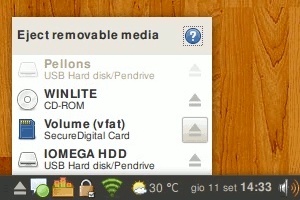
Ejecter

怎样安装 Ejecter

在下载 Ejecter 的源代码后,可执行如下命令来安装:

./waf configure --prefix=/usr
./waf
sudo ./waf install

注意,Ejecter 需要 Gtk、Vala 以及 Python。

Ejecter 的最新版本在 launchpad 上可以找到。

Ejecter

署名 • 注明出处 • 非商业性使用

8 Comments

  1. 1 雪梨 Commented @ 2008-10-27 12:33 pmReply to this comment

    Gnome 自带面板小程序 磁盘挂载者 也可以。

  2. 2 meto Commented @ 2008-10-27 1:39 pmReply to this comment

    kde4自带就有了

  3. 3 yetiboy Commented @ 2008-10-27 3:31 pmReply to this comment

    在我的机子上还是eject这个命令行才能移动硬盘停止转动。。。

  4. 4 lh Commented @ 2008-10-27 4:35 pmReply to this comment

    可惜eject这个命令还需要root权限。现在thunar升级后可以eject部分移动磁盘了。但是我的1.8移动硬盘不能eject。

    类似的还有xfce4的xfce4-volstatus-icon

  5. 5 blucidy Commented @ 2008-10-27 9:10 pmReply to this comment

    跟KDE4的那个好像啊
    不过KDE4.1.2后挂载中文没有乱码了,在那之前可够痛苦的

  6. 6 coding Commented @ 2008-10-27 11:17 pmReply to this comment

    segamentation fault

  7. 7 chenxing Commented @ 2008-10-28 2:52 pmReply to this comment

    嗯,在Debian中直接段错误

  8. 8 coding Commented @ 2008-10-28 10:56 pmReply to this comment

    嗯,arch,openbox,lxpanel,两个ejecter版本都是段错误.