LinuxTOY 是一个致力于提供 Linux 相关资讯的专题站点。如果您发现了好用好玩的 Linux 东东并愿意发扬自由、分享的精神,可以点击顶部导航 Contact 按钮进行投稿。

Related entries

Easystroke:使用鼠标手势操控 Linux 桌面

Easystroke 是一款很好玩的软件,通过它你可以使用鼠标手势来操控 Linux 桌面,比如启动程序、切换桌面等。
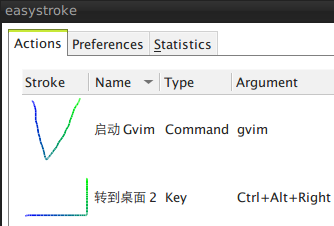
Easystroke

Easystroke 提供有 deb 和通用格式的二进制包以及源代码,各位可按需取用,这里就不多说安装了。

简单说一说用法。在启动 Easystroke 后,首先点击 Add Action 来添加一个操作,比如启动 Gvim 程序。这时可以输入该鼠标手势的名称,类型选择 Command,并在参数中输入 gvim。如上图所示。

接下来,我们需要录制一个鼠标手势。这可以点击 Record Stroke 按钮来完成。比如,我用鼠标在屏幕上画一个形如 V 的手势。这样,当我在屏幕上执行 V 这个鼠标手势时,就会启动 Gvim 了。

好玩吧,赶紧试试去。

署名 • 注明出处 • 非商业性使用

9 Comments

  1. 1 max Commented @ 2008-09-13 10:15 amReply to this comment

    fvwm的飘过

  2. 2 rocrocket Commented @ 2008-09-13 10:40 amReply to this comment

    谢谢toy推荐~
    只是不知道识别率如何
    用鼠标写清V和U的话,还需要一定技术

  3. 3 liufeng Commented @ 2008-09-13 12:50 pmReply to this comment

    libstroke作为一个基本库,不知道GNOME、KDE等桌面是不是直接支持?
    在fvwm上用过libstroke,不过本人不太习惯用它开启程序,一般就用来切换虚拟桌面用了。

  4. 4 afoo Commented @ 2008-09-14 12:22 amReply to this comment

    明天去公司试试去。祝大家中秋快乐!

  5. 5 LanEast Commented @ 2008-09-14 2:28 pmReply to this comment

    @rocrocket: 可以用palm里面的方法,正写当作U,从右往左写当作V嘛:D

  6. 6 xiooli Commented @ 2008-09-15 10:51 amReply to this comment

    好玩,哈哈

  7. 7 Neoriva Commented @ 2008-09-16 8:54 amReply to this comment

    不错的说~~~

  8. 8 sfufoet Commented @ 2008-09-18 7:38 amReply to this comment

    http://article.pchome.net/content-716682.html

  9. 9 Toy Commented @ 2008-09-18 9:58 amReply to this comment

    @sfufoet: 感谢通知。