小技巧: 如何在 Compiz 中配置菜单透明

Compiz 能够为 Linux 桌面带来非常不错的三维效果,相信有不少朋友在使用吧。想不想让你的 Linux 桌面变得更酷?只需根据下述小技巧的指引,你就可以让整个 Linux 环境中的应用程序菜单透明起来,操作并不复杂,花一会儿时间就好。
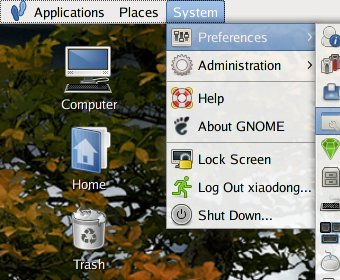
Menu transparency

  1. 按 Alt + F2,在打开的对话框中输入“ccsm”,启动 Compiz 配置程序。
  2. 点击“General Options”,并切换到“Opacity Setting”选项卡。
  3. 展开“Window opacities”,点击“Add”按钮。
  4. 在打开的对话框中输入“Tooltip | Menu | PopupMenu | DropdownMenu”,并设置透明值为 90。你可根据自己的需要酌情修改该值。

不用重启 Compiz,该修改是即时生效的。事实上,除了菜单,你也可通过此处设置应用程序的窗口为透明。

[via Ars Technica]

Read More:

17 Comments

  1. 1 yang~ Commented @ 2007-11-15 17:23Reply to this comment

    Like tiger's Menu.

  2. 2 Commented @ 2007-11-15 17:23Reply to this comment

    谢了

  3. 3 cooked_bird Commented @ 2007-11-15 18:20Reply to this comment

    我还是比较习惯Alt+鼠标滚轮

  4. 4 yegle Commented @ 2007-11-15 18:43Reply to this comment

    我觉得类似这样的小技巧比**软件更新到***版这样的日志有用得多……勿怪,呵呵……

  5. 5 eagle Commented @ 2007-11-15 19:01Reply to this comment

    gnome-panel呢?

  6. 6 内存不足 Commented @ 2007-11-15 19:25Reply to this comment

    gnome-panel呢???← alt+滚轮

  7. 7 yegle Commented @ 2007-11-15 19:39Reply to this comment

    @eagle id好像啊……

  8. 8 eagle Commented @ 2007-11-15 19:47Reply to this comment

    还在啊?

  9. 9 gcell Commented @ 2007-11-15 19:48Reply to this comment

    啊,你的图标什么主题的,很不错,请教一下,谢谢!

  10. 10 semson Commented @ 2007-11-16 1:51Reply to this comment

    >>gnome-panel呢? 加一項 "type=dock", 透明度就設 90-95都很不錯 alt+scroll的缺點是不夠精確

  11. 11 xrfang Commented @ 2007-11-16 7:47Reply to this comment

    sudo apt-get install compizconfig-settings-manager

    gutsy默认没有安装

  12. 12 Toy Commented @ 2007-11-16 10:15Reply to this comment

    @gcell:从 Ubuntu Studio 中提取出来的。

  13. 13 wyg1258 Commented @ 2007-11-16 13:53Reply to this comment

    @Toy: 是studio 7.10吗

  14. 14 yegle Commented @ 2007-11-16 15:10Reply to this comment

    如何使scim的输入条也透明呢?

  15. 15 Toy Commented @ 2007-11-16 16:04Reply to this comment

    @wyg1258:对的。

  16. 16 gcell Commented @ 2007-11-16 17:41Reply to this comment

    @Toy: 晕,算了,在没人单独发布出来之前继续用glass图标

  17. 17 rn Commented @ 2007-12-07 12:43Reply to this comment

    添加这两条 (type=Normal | Dialog | ModalDialog | Utility | Unknown) 90 (DropdownMenu | PopupMenu) 90 将使所有UI透明度为90