Cacti:网络流量监测工具

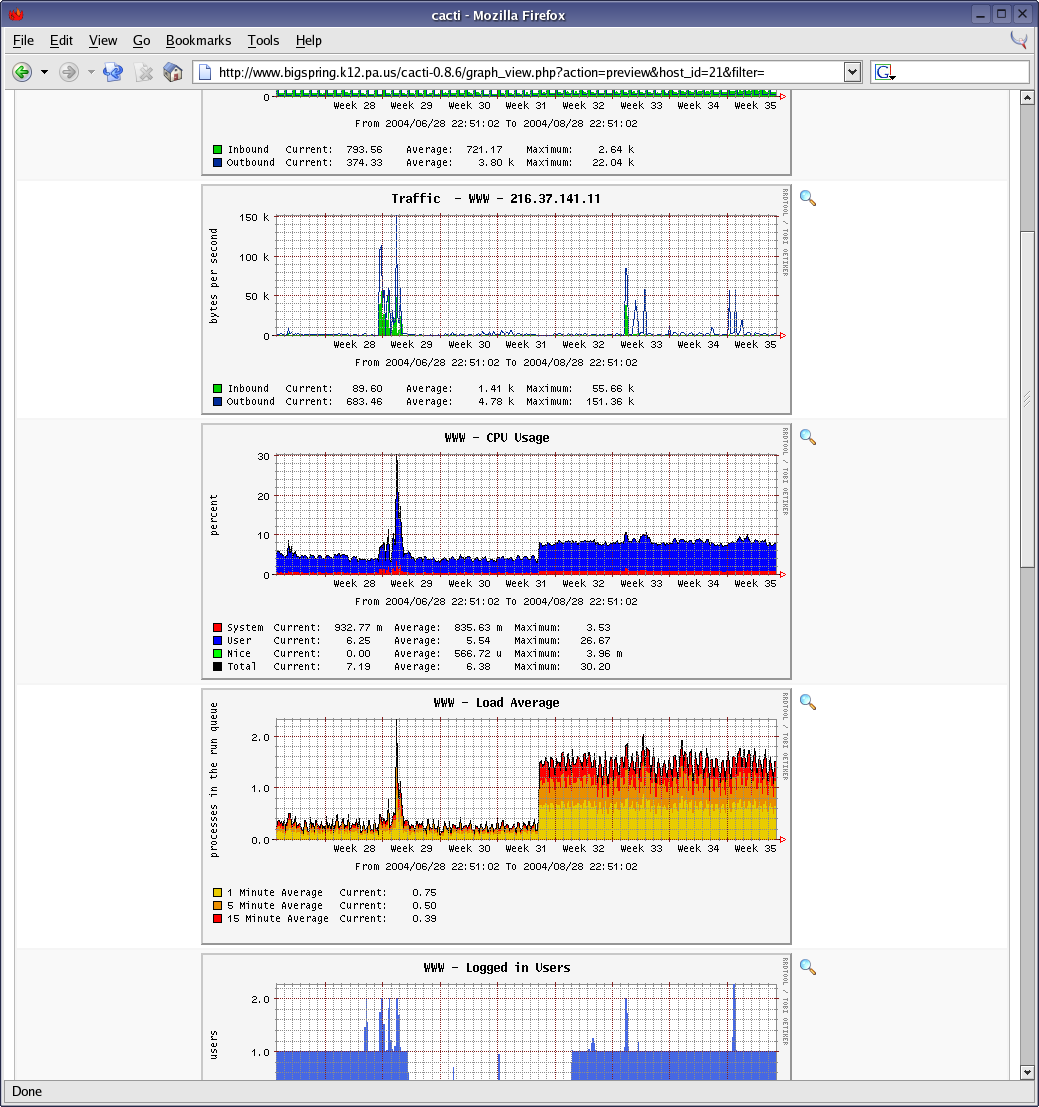
Cacti 是一款基于 PHP 的网络流量监测工具,与 ntop 相比功能更强大。它通过 snmpget 获取数据,用 RRDtool 绘制图形。

Cacti

Cacti Demo

使用 Cacti 需要 PHP、MySQL、snmp、rrdtool 等环境和工具。在安装前保证它们的正常运行。

Ubuntu 用户可通过 apt-get 来获得。安装完后在浏览器中输入 http://localhost/cacti 就可监测网络流量。

官方网站:http://www.cacti.net/ 下载地址:http://www.cacti.net/downloads/cacti-0.8.7b.tar.gz 截图:http://www.cacti.net/screenshots.php

Read More:

  • No related posts

11 Comments

  1. 1 hmy Commented @ 2008-08-26 17:54Reply to this comment

    非常不错的工具,用了很久了,在debian上配置非常简单。 有空了发布一个puppet的配置文件,让安装更方便。

  2. 2 hmy Commented @ 2008-08-26 18:00Reply to this comment

    其实cacti不只是用来检测网络流量。它可以检测你所有能量化的数据。 比如网页访问量,数据库连接量,硬盘温度这些的变化曲线 因为cacti支持通过脚本获取数据,所以写一个简单的bash脚本就能获得数据了,很方便。 另外单纯监视网络流量有个比cacti更好的工具,有时间了我提交文章介绍介绍

  3. 3 MDZ Commented @ 2008-08-26 18:26Reply to this comment

    hmy 说得没错。:-)

  4. 4 latteye Commented @ 2008-08-26 20:26Reply to this comment

    这个介绍的太不专业了。 cacti 和 ntop 是两种原理的工具。他们的应用场合也是不同的。 一句 “与 ntop 相比功能更强大” 有点忽悠观众了。 ntop 的绘图功能也可以做的很强,据说配合 netflow 也很好。

    ntop 更多的用来监视, cacti 更多的用来监控。

  5. 5 phpman Commented @ 2008-08-26 22:03Reply to this comment

    cacti和ntop适合不同的场合,cacti适合监控分散在各地的服务器,treeview可以很好的组织视图,还有很多好用的插件,不光可以监控流量,还可以监控任何自己感兴趣的数据。抓取保存的rrd数据还可以做二次开发,或者直接在cacti里摆弄数据。相比指向ntop似乎就只能在网关上安装,适合监控内网的流量。

  6. 6 netxfly Commented @ 2008-08-27 9:23Reply to this comment

    不错,好东西,收藏了。

  7. 7 lxlxdw Commented @ 2008-08-28 18:41Reply to this comment

    To hmy 我发觉阁下好强, 不是小强.

  8. 8 sunux Commented @ 2008-08-29 8:57Reply to this comment

    不知道hmy说的监控流量比cacti还好的是什么东东,说出来听听嘛,没时间介绍给说个名字也行啊

  9. 9 hmy Commented @ 2008-08-29 10:50Reply to this comment

    @sunux 我说的就是smokeping

  10. 10 Joe Chen Commented @ 2009-04-30 19:33Reply to this comment

    Smokeping 基本用來觀察網路設備的穩定度, 倒不是用來查看流量的。 可以用多種方法來觀察各種不同協議的服務狀態, 製作圖表後, 可利於觀察不同時段下, 該項網路服務是否保持良好狀態。

  11. 11 cc Commented @ 2009-12-28 10:02Reply to this comment

    > ntop 更多的用来监视, cacti 更多的用来监控。

    监视和监控有什么区别呢,不解??