用 xVideoServiceThief 下载你喜爱的互联网视频

xVideoServiceThief 这个软件让你能够从视频网站上将你喜爱的视频下载下来并同时转换为你指定的视频格式。xVideoServiceThief 的安装使用都非常简单,你可以从它的主页直接下载预编译好的二进制包,也可以下载源码包自己编译安装。下载的二进制包直接解开后运行 xvst 即可。使用则更简单,直接复制视频的 url 地址,然后点击软件主界面上的 Add Video,在弹出的对话框里粘贴上 url,然后 xVideoServiceThief 就会自行下载该视频了。
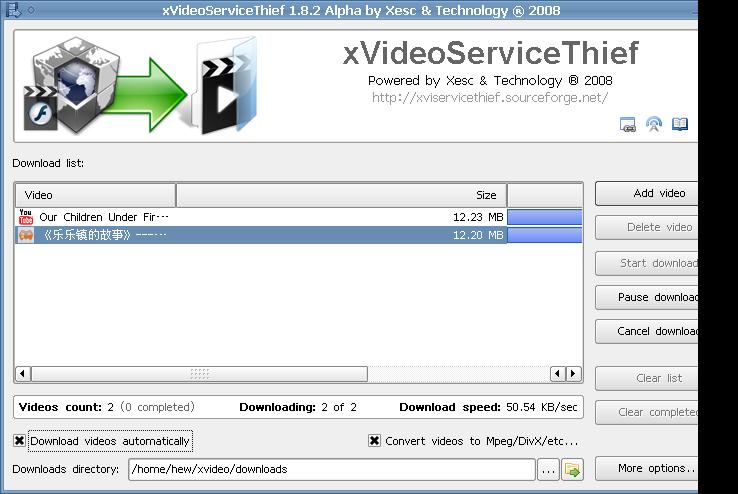
xVideoServiceThief

不过很可惜的是国内几个大的视频站点 xVideoServiceThief 只支持一个土豆,如优酷、56、酷 6 等都不支持。

[撰文/hew]

Read More:

  • » No related posts

9 Comments

  1. 1 owl Commented @ 2008-04-01 17:24Reply to this comment

    路过

  2. 2 luojie-dune Commented @ 2008-04-01 17:31Reply to this comment

    楼上是不是也叫owlet,好久不见了~~~ 这个功能也是非法的吧~~~和firefox插件一样。

  3. 3 allbluedream Commented @ 2008-04-01 18:15Reply to this comment

    走到哪里都是熟人啊~~

    Flash视频我一般直接从/tmp目录读取的

  4. 4 lh Commented @ 2008-04-01 20:07Reply to this comment

    土豆教育网实在是太慢了。。youku不错。居然不支持

  5. 5 dogfox Commented @ 2008-04-01 20:33Reply to this comment

    使用wine下的迅雷,比这快多了

  6. 6 Commented @ 2008-04-01 21:50Reply to this comment

    勾选了转换视频,没用

  7. 7 xzf16 Commented @ 2008-04-01 22:00Reply to this comment

    在firefox里安装firebug

    然后enable firebug

    然后到你要看的视频的页面

    然后点右下角firebug的图标

    然后点net

    然后搜索flv

    然后复制

    然后就可以下载了

    比这个方便多了

    并且所有的网站都支持

  8. 8 hongewuyan Commented @ 2008-04-02 18:39Reply to this comment

    没人用downloadhelper扩展? 下这些flv很方便。。。

  9. 9 islet8 Commented @ 2009-05-08 9:34Reply to this comment

    现在土豆似乎已经封掉这些第三方下载了,只能用它自己的下载器在win下下载。。。