xdiskusage — 查看磁盘占用情况

我们知道在 Linux 中有一个命令行工具 du 可以查看文件或目录的占用情况。如果你对使用命令行界面感到棘手的话,那么不妨来试试 xdiskusage 这个具有图形化界面的程序。xdiskusage 除了能够调用 du 来显示磁盘的占用情况外,它还可以产生图形化的输出,即通过矩形块来表示文件或目录的占用情况。
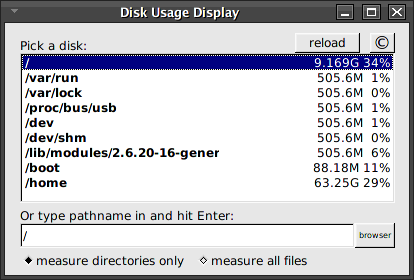
xdiskusage

xdiskusage 的使用非常简单,在启动程序之后,选择需要查看的目录即可。你也可以选择查看所有文件。下图所显示的便是查看我的系统中 / 目录的情况。
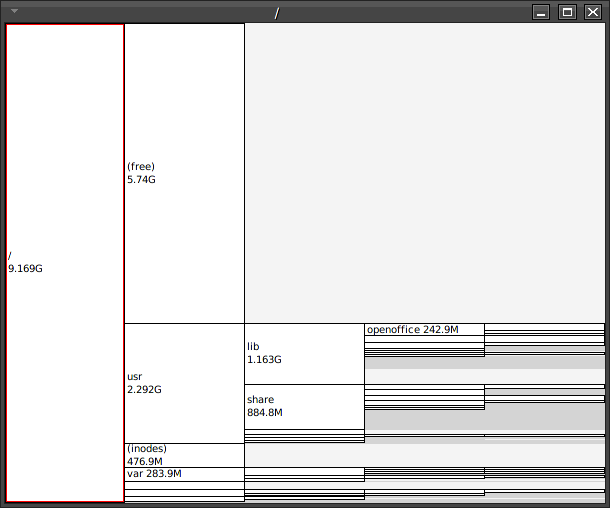
xdiskusage

你可以从这里找到 xdiskusage 的源代码及可执行文件

Read More:

  • » No related posts

8 Comments

  1. 1 BiFF Commented @ 2007-08-17 8:49Reply to this comment

    没有图形界面用 du

    Gnome 用 baobab

    KDE 用 filelight

    这个有点不伦不类的了

  2. 2 小P Commented @ 2007-08-17 9:22Reply to this comment

    同意楼上,用这个没什么意义

  3. 3 fcicq Commented @ 2007-08-17 10:03Reply to this comment

    xfce4 mount device 都比这个好看 :(

  4. 4 stlxv Commented @ 2007-08-17 10:34Reply to this comment

    Ubuntu 7.04: 应用程序->附件->磁盘使用分析器

  5. 5 yang~ Commented @ 2007-08-17 12:51Reply to this comment

    toy,这是你截的图么?是不是fluxbox的主题啊?能把这个主题的地址说说么?

  6. 6 Toy Commented @ 2007-08-17 13:24Reply to this comment

    @yang:是我的截图,但不是 Fluxbox 的主题。该主题为 Black

  7. 7 cxzhp@163.com Commented @ 2008-01-02 13:01Reply to this comment

    du 不如 xdiskusage 好用的

  8. 8 tobeme2 Commented @ 2010-03-10 8:40Reply to this comment

    xdiskusage是很好的选择 优点: 1.小巧,独立,无依赖关系; 2.分析速度快; 3.支持快捷键,使用顺手。 缺点: 1.界面不是很漂亮。

    综述: 用过baobab,filelight,分析速度没xdiskusage快,功能上几款软件没一点差别。 如果不用桌面环境(KDE,GNOME等),选xdiskusage没错的。
