在 Linux 上用 Subtitle Editor 制作字幕

[撰文/kaiman]

Subtitle Editor 是一款针对文本格式类字幕的编辑工具,支持多种字符编码和字幕格式(Sub Station Alpha、Advanced Sub Station Alpha、SubRip、MicroDVD、MPL2、MPsub (MPlayer subtitle)、SubViewer 2.0、Plain-Text、Adobe Encore DVD)。集多种字幕编辑工具的优点如错误检查、合并、分割、基于时间轴编辑等功能于一身。能够实现字幕的实时预览,从设计上它是基于 GStreamer 的,这是一个很有前途的设计。另一个主要功能就是通过音频波形来辅助设定字幕的位置和停留时间,虽然还需要字幕制作的技巧但仍不失为是一个不错的辅助手段。
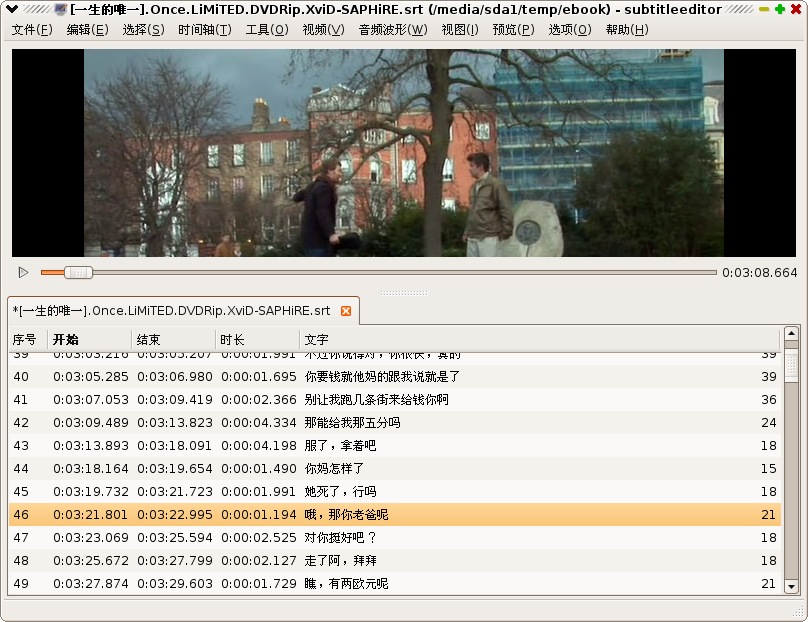
Subtitle Editor

我在 launchpad.net 上注册了一个项目镜像了源码和发布,启动了国际化的翻译工作,现在的 Subtitle Editor 已经有完整的简体中文界面了。

参考

  1. http://home.gna.org/subtitleeditor/
  2. 使用教程

Read More:

6 Comments

  1. 1 roc Commented @ 2008-09-06 12:49Reply to this comment

    这个工具对制作电影很有用

  2. 2 venhow Commented @ 2008-09-06 17:58Reply to this comment

    正需要,very nice

  3. 3 google Commented @ 2008-09-06 18:31Reply to this comment

    哦,arch上已经是最新的0.23了。

  4. 4 Terry Commented @ 2008-09-06 19:09Reply to this comment

    不错,我喜欢这个工具。谢谢介绍。

  5. 5 razu Commented @ 2008-09-06 19:11Reply to this comment

    一个很不错的工具,以前校对字幕只能在windows下处理,现在好了!!

  6. 6 transtone Commented @ 2008-11-17 11:14Reply to this comment

    @razu 还有 gaupol:http://home.gna.org/gaupol/ 和 jubler:http://www.jubler.org/ 可以用啊:)