在 Linux 桌面添加漂亮的日历

想在你的 Linux 桌面上添加漂亮的日历吗?使用 Rainlendar 桌面日历程序只需几个简单的步骤就可办到。此外,你也可以使用 Rainlendar 来记录重要的事件和待做事项。
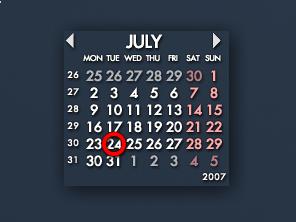
Rainlendar 漂亮的桌面日历

  1. 下载 Rainlendar,目前是 2.2 版,我们以下载 Lite 版为例: wget -c http://www.rainlendar.net/download/Rainlendar-Lite-2.2.tar.bz2
  2. 解开 Tarball 文件: tar jxvf Rainlendar-Lite-2.2.tar.bz2
  3. 执行 Rainlendar: cd rainlendar2 ; ./rainlendar2

如果你希望开机便让 Rainlendar 启动,那么可以将其加入到 Sessions 的启动程序中。另外,你也可以在这里找到 Rainlendar 的简体中文语言文件,以及其他好看的皮肤

Read More:

23 Comments

  1. 1 aitilang Commented @ 2007-07-24 16:27Reply to this comment

    evolution凑合用啊

  2. 2 Mily Commented @ 2007-07-24 17:36Reply to this comment

    一直在用,很不错

  3. 3 Mily Commented @ 2007-07-24 17:41Reply to this comment

    只不过有时候启动的时候不能跟着系统一起启动 再运行也不出来,没有报错信息 常常需要杀掉桌面再重新进一次,或者多次 不知道是怎么回事,随机时好时坏,不能重复 不过那是用2.1时的事,刚升级到2.2,不知道有没有改善 系统feisty+xfce4.4

  4. 4 qcshzihnus Commented @ 2007-07-24 19:09Reply to this comment

    用的2.1,在启动脚本开头加入 rm ~/.config/.rainlendar2/Rainlendar2* 似乎可以解决启动问题

  5. 5 bomber Commented @ 2007-07-24 21:03Reply to this comment

    very nice in fc7

  6. 6 stlxv Commented @ 2007-07-24 21:48Reply to this comment

    要求libexpat至少1.95.8,我的ubuntu里的才1.0.0

  7. 7 davix Commented @ 2007-07-25 0:17Reply to this comment

    唉,现在什么日历都不显示农历,真希望自己有时间能够做出贡献,增加农历及中国节日的支持

  8. 8 ahui Commented @ 2007-07-25 13:00Reply to this comment

    运行./rainlendar2 时出现 Failed to touch the file '/home/wu9506/.config/.rainlendar2/rainlendar2.ini' (error 2: No such file or directory)

    Unable to create configuration file: /home/wu9506/.config/.rainlendar2/rainlendar2.ini Make sure that the folder has write permissions. 修改 chmod -R 777 /home/wu9506/.config/.rainlendar2的权限后再运行./rainlendar2时没反应。 系统:ubuntu 7.04+ gnome+ scim

  9. 9 Toy Commented @ 2007-07-25 13:44Reply to this comment

    @ahui:试试执行 touch /home/wu9506/.config/.rainlendar2/ rainlendar2.ini,再启动 Rainlendar。

  10. 10 zgw Commented @ 2007-07-25 14:13Reply to this comment

    不行的,touch后,在启动Rainlendar,就出现了Segmentation fault (core dumped)

  11. 11 ahui Commented @ 2007-07-25 14:53Reply to this comment

    用TOY的方法试了一下,如zgw所说,出现了段错误 (core dumped)

  12. 12 CNBorn Commented @ 2007-07-25 15:12Reply to this comment

    一直在用gdeskcal。

  13. 13 ahui Commented @ 2007-07-25 15:18Reply to this comment

    不知道TOY使用的是linux的哪个发行版本?

  14. 14 Toy Commented @ 2007-07-25 15:53Reply to this comment

    @ahui:和你一样,不同的是我使用 fcitx 输入法。

  15. 15 ahui Commented @ 2007-07-25 17:27Reply to this comment

    用scim-bridge代替scim sudo apt-get install scim-bridge scim-qtimm 编辑im-switch生成的scim配置文件 sudo gedit /etc/X11/xinit/xinput.d/scim 将默认的 GTKIMMODULE=scim 修改为 GTKIMMODULE="scim-bridge"

    rainlendar2与scim冲突的问题解决了

  16. 16 ahui Commented @ 2007-07-25 17:34Reply to this comment

    不过在ubuntu中文wiki中不建议feisty版本进行这些设置,特别是kubuntu中,不知道是什么原因?

  17. 17 bomber Commented @ 2007-07-25 20:34Reply to this comment

    手动在报错的位置新建那个ini文件就可以解决了!

  18. 18 ivan Commented @ 2007-07-25 22:13Reply to this comment

    我以前也用FCITX,用UBUNTU7.04,但是最近安装COMPIZ FUSION时加了新源更新后FCITX用不了了,不知怎么回事

  19. 19 Tony Commented @ 2007-07-26 8:03Reply to this comment

    Google的日历有农历节日,emacs的日历支持农历。

  20. 20 noxide Commented @ 2007-07-26 8:37Reply to this comment

    在windows下就用过了的,很不错

  21. 21 jack Commented @ 2007-08-01 18:12Reply to this comment

    我的是Ubutun 7.04 + gnome + scim,启动时和ahui出现的情况是一样的,使用bomber的方法也试了,但是都不行,双击或在命令窗口运行,是不会出现错误了,但是什么反应也没有。

  22. 22 colin Commented @ 2010-10-14 11:58Reply to this comment

    激活不了fcitx,不知道怎么回事

  23. 23 colin Commented @ 2010-10-14 12:07Reply to this comment

    要用中文才行的.明白了.呵呵.
