Prism for Firefox: 直接从 Firefox 中创建 Prism 应用

如果你在使用 Prism 的话,那么 Prism for Firefox 应当在你的必备 Firefox 扩展中占有一席之地。有了 Prism for Firefox 的帮助,你可以直接从 Firefox 中创建自己喜爱的 Prism Web 应用,非常方便。

Prism for Firefox 的使用十分简单,在自己所喜爱的 Web 应用 (如 Gmail) 打开的前提下,只需点击 Tools → Convert Website to Application 菜单即可打开如下所示的对话框:
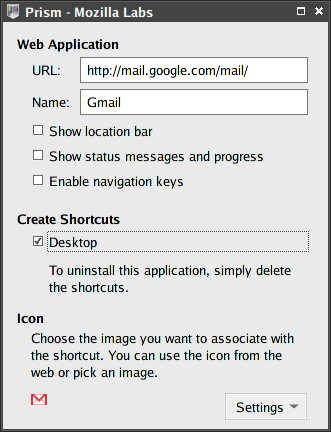
Prism

稍作设置点击 OK 即创建成功。

Prism for Firefox 可从 Firefox 的 Add-ons 站点下载安装。

Read More:

5 Comments

  1. 1 passi Commented @ 2008-04-08 10:00Reply to this comment

    这用的是什么主题啊!和漂亮

  2. 2 自家兄弟 - 畅想帮 Pingbacked @ 2008-04-08 13:40Reply to this comment

    [...] 这是linuxToy的文章:Prism for Firefox: 直接从 Firefox 中创建 Prism 应用。上回的题目之一就是寻找gmail on air;这回的gmail on Prism更简单! [...]

  3. 3 TTG Commented @ 2008-04-08 16:28Reply to this comment

    这东西能调界面字体大小不?

  4. 4 SecretZero Commented @ 2008-04-08 19:30Reply to this comment

    界面好似是我用这个。

  5. 5 xiaomao101 Commented @ 2008-10-01 23:31Reply to this comment

    怎么在sidebar打开了