LinuxTOY 是一个致力于提供 Linux 相关资讯的专题站点。如果您发现了好用好玩的 Linux 东东并愿意发扬自由、分享的精神,可以点击顶部导航 Contact 按钮进行投稿。

Related entries

Lunar Applet:在桌面显示农历

Lunar Applet 是一个 GNOME 面板小程序,你可以使用它在 Linux 桌面上显示农历。对我们来说,该程序十分具有帮助,通过它查阅当前的农历日期,就不会错过重要的节日了。
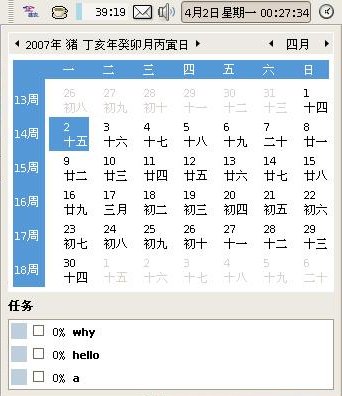
Lunar Applet

要使用 Lunar Applet,需要自行编译安装,可按照以下步骤执行:

  1. 下载 Lunar Applet 1.4
  2. 解包:tar zxvf lunar-applet-1.4.tar.gz
  3. cd lunar-applet-1.4/
  4. ./configure
  5. make
  6. sudo make install

然后通过右击 GNOME 面板,就可以添加 Lunar Applet 了。

署名 • 注明出处 • 非商业性使用

15 Comments

  1. 1 lyman Commented @ 2007-04-04 7:08 pmReply to this comment

    如果 ./configure 不过的话,很可能是缺少这个包: libpanel-applet2-dev

  2. 2 Toy Commented @ 2007-04-04 7:16 pmReply to this comment

    @lyman:感谢提醒!

  3. 3 tim Commented @ 2007-04-04 7:37 pmReply to this comment

    解压错误,下载了两遍都是如此,楼主给个镜象吧

  4. 4 tim Commented @ 2007-04-04 7:37 pmReply to this comment

    gzip: stdin: unexpected end of file
    tar: 归档文件中异常的 EOF
    tar: 归档文件中异常的 EOF
    tar: 错误不可恢复:现在退出

  5. 5 Toy Commented @ 2007-04-04 8:20 pmReply to this comment

    @tim:已更新下载链接。

  6. 6 tim Commented @ 2007-04-05 12:03 amReply to this comment

    You are not allowed to access the system configuration.
    怎么没有一个输入密码获得权限的窗口呢?

  7. 7 ahu Commented @ 2007-04-05 6:19 amReply to this comment

    @lyman
    的确是缺少这个包,apt-get intsall libpanel-applet2-dev再./configure就ok了

  8. 8 lzhan Commented @ 2007-04-05 11:04 amReply to this comment

    It works, thanks!

  9. 9 tim Commented @ 2007-04-05 11:30 amReply to this comment

    改一下时间都不行啊,难道非要我登陆到root帐户才让改?

  10. 10 davix Commented @ 2007-04-05 12:22 pmReply to this comment

    不知道KDE下有没有农历程式,linux下中国元素太少了

  11. 11 BiFF Commented @ 2007-04-05 12:51 pmReply to this comment

    Lunar Applet在SUSE10.2下编译安装正常,反键没有任何选项,也看不到有农历?

  12. 12 lukehust Commented @ 2007-05-15 9:14 pmReply to this comment

    configure时:
    checking for LIBPANEL_APPLET… configure: error: Package requirements (libpanelapplet-2.0 >= 2.14.3) were not met:
    No package ‘libpanelapplet-2.0′ found
    Consider adjusting the PKG_CONFIG_PATH environment variable if you
    installed software in a non-standard prefix.

    执行--(很可能是缺少这个包: libpanel-applet2-dev)
    -desktop:~/lunar-applet-1.4$ sudo apt-get intsall libpanel-applet2-dev
    E: 无效的操作 intsall

    不知道怎么回事,哎,知道发个邮件给我

  13. 13 lisir Commented @ 2007-06-04 12:47 pmReply to this comment

    TO:BiFF
    你安装完后只是安装到系统上了,你没有添加在面板上当然没有显示了。添加一下试试。

  14. 14 lisir Commented @ 2007-06-04 12:50 pmReply to this comment

    TO:lukehust
    你注意看看,不应该是intsall,而应该是install,人家打错了,你自己也应该知道怎样改才对,这又不是什么大问题,而是常用的apt-get命令。

  15. 15 lisir Commented @ 2007-06-04 1:05 pmReply to this comment

    我怎么configure通过,但执行make时提示:
    /bin/sh: -o: not found
    make[2]: *** [zh_CN.gmo] 错误 127
    make[2]: Leaving directory `/home/lisir/downloads/lunar-applet-1.4/po’
    make[1]: *** [all-recursive] 错误 1
    这是怎么回事呢?请指教!谢谢!