Indicator-VirtualBox: 从桌面面板快速启动虚拟机
Indicator-VirtualBox 这个 Indicator 允许你通过桌面面板来快速的启动虚拟机。使用 Indicator-VirtualBox 无需开启 VirtualBox 主窗口,如果你需要经常使用虚拟机,那么利用 Indicator-VirtualBox 将会非常方便。
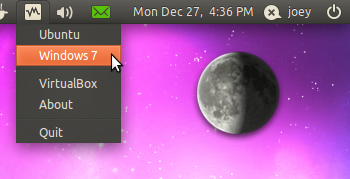
该 Applet 由 astrapi 所开发,Ubuntu 用户可通过其 PPA 进行安装。
sudo add-apt-repository ppa:michael-astrapi/ppa
sudo apt-get update
sudo apt-get install indicator-virtualbox
{ via Omg!Ubuntu }

Read More:
节省内存吗?
没啥用
把vm添加到顶端的panel,然后在属性里加 --startvm vmid,直接点击就可以了。
VBoxManage startvm $vmid
还行吧,就是一抽屉,加上面的启动项
很扫兴的说一句, 这个不是应该用alias解决的问题咩...
@xiaket: how?
偶现在用Headless启动虚拟机,不然很耗资源……所以这么多快捷方式估计都不能用了……:(
@c: add this to your .bashrc:
alias start1='VBoxManage startvm deb1'
run start1 from commandline.
@xiaket:
@tayhe:
但这样启动的虚拟机是在后台运行吧,Indicator-VirtualBox的意思应该能在前台打开窗口,否则真的没什么意思了
@Ra: 命令行可以前台启动虚拟机。 另外,对kde用户,krunner也有插件可以直接启动虚拟机……
不知道vmplayer能不能也直接启动?