Ext2 IFS For Windows

Ext2 IFS 即 Ext2 Installable File System,它是一个免费的 Windows 软件,使用它可以在 Windows 系统中访问 Linux Ext2/Ext3 分区,支持读写操作。该软件对于安装 Windows 和 Linux 双系统的朋友极为有用。
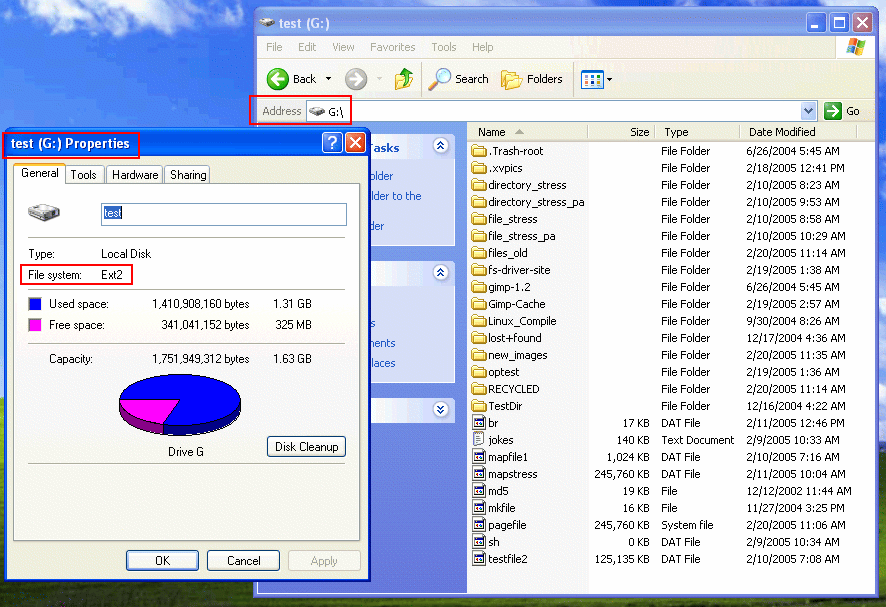
Ext2 For Windows

Ext2 IFS 具有的特性包括:

  • 支持 Windows NT 4.0、2000、XP、2003 等系列。
  • 在 Linux Ext2/Ext3 分区上可以完成读取和写入文件、列出目录、创建、重命名、移动、删除文件或目录、查询并修改卷标等操作。
  • 支持容量超过 4GB 的文件。
  • 支持页面文件,也就是说 Windows 的页面文件可以设置到 Linux 的 Ext2/Ext3 分区上。

有需要的朋友,可以一试。

Download link:

Ext2 IFS For Windows (460 KB)

Read More:

  • » No related posts

5 Comments

  1. 1 benben Commented @ 2006-12-26 21:03Reply to this comment

    中文文件显示为乱码!怎么办?

  2. 2 benben Commented @ 2006-12-26 21:09Reply to this comment

    中文文件名为乱码!

  3. 3 limon Commented @ 2006-12-31 20:28Reply to this comment

    写操作没有危险吗?

  4. 4 NYF Commented @ 2007-01-03 12:27Reply to this comment

    在linux下或者win做的中文文件名互为乱码,请问如何解决

  5. 5 free world » Blog Archive » Ext2 Installable File System For Windows Pingbacked @ 2007-11-23 11:28Reply to this comment

    [...] 以上内容来自http://linuxtoy.org/archives/ext2ifsfor_windows.html [...]