解决 Exaile 音乐播放器中文乱码

Exaile 是一个很棒的音乐播放器,有方便的播放列表标签,自动分类、排序,音乐文件浏览和搜索。不过默认的 Exaile 没有考虑国内 GBK 标签的 MP3,我给写了个 GBK 补丁,加了自动转码以支持国内的 MP3 中文。
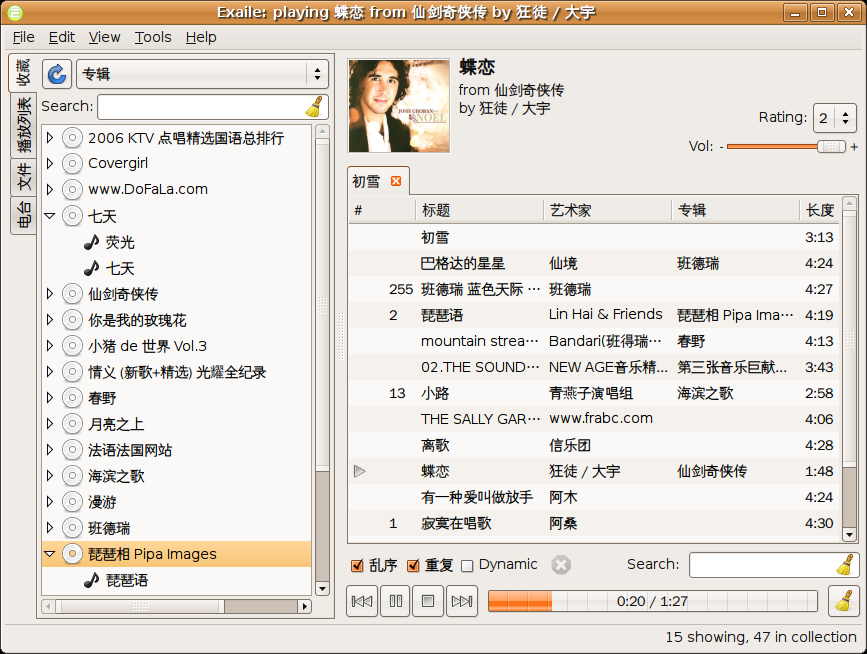
Exaile

Exaile 已正常识别 GBK 的 MP3 标签

应用补丁

可以先 apt 或从 www.getdeb.net 安装 Exaile 音乐播放器,然后在终端里边执行:

grep -q gb18030 /usr/share/exaile/xl/media/mp3.py || sudo sed -i '/unicode(id3/a\ \ \ \ try: text = id3[t].text[0].encode('iso-8859-1').decode('gb18030')\n\ \ \ \ except: pass' /usr/share/exaile/xl/media/mp3.py

再重新导入音乐,就可以看到能自动识别 GBK 的 MP3 标签了。

[撰文/华华]

Read More:

20 Comments

  1. 1 华华 Commented @ 2007-11-25 11:25Reply to this comment

    在考虑怎么写个不 dirty 的补丁,好提交给官方。 xyb 前辈的意见是加一个智能判断,发现有乱码自动提醒用户做设置。

    恩,单独做成插件倒是可以显得不脏,但是我希望播放器是开箱即用,不需要用户知道做任何多余的设置。 其他的播放器,如 quodlibet 其实是可以转码,但是普通用户不可能去配置编码。

  2. 2 华华 Commented @ 2007-11-25 11:31Reply to this comment

    想先给 Exaile 加上百度歌词, 没想好怎么来显示歌词。

    rhythmbox 是要到属性对话框里看,比较麻烦, amarok 的要求播放器放在前台,还要占据侧栏空间。

    先考虑 osd 显示单行歌词, 让播放器不用放在前台。

  3. 3 ahtya Commented @ 2007-11-25 11:39Reply to this comment

    强!支持

  4. 4 razu Commented @ 2007-11-25 12:27Reply to this comment

    强烈支持华华!!

  5. 5 glorioustao Commented @ 2007-11-25 13:03Reply to this comment

    http://www.osxcn.com/ubuntu/mp3-tag-encoding.html 里面对mp3标签乱码分析得很好,并给了两种解决方法,都是需要用户用其他工具把标签转成utf8格式的.....

    现在所有播放器基本都有这个问题,audacious添加了自动识别功能,但识别的效果并不是很好,但至少留出了配置选项,其实我倒是觉得自动识别时如果能把地域因素加上去,会更好一点

    在utf8环境下其他软件,如vim,gedit,filezilla都留出了配置选项可以自动识别非utf8编码, 但需要自己进行配置,这点对用户不太友好.如果能把这些配置都集中起来,比如集成到ubuntu7.10系统管理-->语言支持中,或者我们自己单独做成一个包,对所有安装的软件提供中文环境配置支持,那样对用户是不是有点好处?

  6. 6 fengluo Commented @ 2007-11-25 13:12Reply to this comment

    很好! 赞一个! 强烈支持啊!

  7. 7 华华 Commented @ 2007-11-25 13:37Reply to this comment

    @glorioustao: 不, gedit 这些在中文语言下是会自动识别 GB18030 这些的, 需要自己配置的情况是用户使用非中文环境,但又需要使用中文。

    这次改 Exaile 也是因为有位在瑞典的朋友跟我提到几个中文问题。

    关于中文,我倒是尝试放了一个 快捷方式

  8. 8 华华 Commented @ 2007-11-25 13:50Reply to this comment

    恩,有朋友说到这样处理不符合标准,推荐统一转 UTF-8 云云,

    那就发下牢骚吧, 神知道那天杀的 mp3 标签是什么猪头制定的, 多少年了还是乱七八糟,想改就改, 真要标准的话何苦用这破 MP3 格式, 直接听 ogg 甚至无损的 flac 恰不更好。

    那位瑞典朋友是希望不用改任何东西就可以直接正常播放她原先的 mp3, 干吗要关心什么猪头标准。 另外,我的假 iPod 只支持 GBK,总不致于 PC 和 iPod 分别转码一次吧。

  9. 9 华华 Commented @ 2007-11-25 13:55Reply to this comment

    @glorioustao: 中文的在 http://linuxfire.com.cn/~huahua/ub/mub.desktop http://linuxfire.com.cn/~huahua/ub/mub.txt

  10. 10 y7etiboy Commented @ 2007-11-25 15:51Reply to this comment

    Exaile可以显示歌词啊。还有符号谱和来自wiki的介绍。右键->information就行了。不过,没有中文歌曲的支持,它也没有选项改变获取那些信息的网址的地址

  11. 11 wyg1258 Commented @ 2007-11-25 16:04Reply to this comment

    太好了~又多了一个选择

  12. 12 froglet Commented @ 2007-11-25 23:06Reply to this comment

    songbird导入的中文文件名的播放列表也是乱码,有办法解决吗?

  13. 13 华华 Commented @ 2007-11-26 11:16Reply to this comment

    @y7etiboy: 我说的是漂亮地显示百度歌词

    @froglet: 应该可以

  14. 14 olo Commented @ 2007-12-02 17:17Reply to this comment

    不好意思!如果在Gentoo下如何使用patch emerge后没有media/目录。我创建了一个mp3.py。好像没用。 要把patch打进去?谢谢

  15. 15 雪梨 Commented @ 2008-04-28 16:53Reply to this comment

    这是适用于 exaile-0.2.11 的补丁

    http://launchpadlibrarian.net/13981853/legacy-encodings-support.diff

    效果 http://img254.imageshack.us/img254/8564/screenshot2cv7.png

  16. 16 fanqo Commented @ 2008-05-18 21:52Reply to this comment

    请问雪梨,这补丁应该怎么用啊。 难道要自己编译?

  17. 17 yjwork Commented @ 2009-01-06 22:22Reply to this comment

    搞了一晚上,终于折腾出来了 Debian lenny用户,exaile-0.2.11 因为路径不同,需要修改 这里给出一个如何重新制作deb包的方法 apt-get source exaile cd exaile-0.2.11.1+debian 修改该目录下/root/exaile-0.2.11.1+debian/xl/media/mp3.py文件 找到这行 "WOAR": "website", } 插入下面的代码 unicode = unicode def unicode(string, encoding='utf8', errors='strict'): """converts ID3 tags from legacy encodings to Unicode """ try: string = string.decode('utf8').encode('iso8859-1') except: return _unicode(string) for enc in ('utf8', 'gb2312', 'big5', 'gb18030', 'big5hkscs', 'euc-jp', 'euckr', 'cp1251', 'utf16'): try: return string.decode(enc) except: pass return string

    然后就是重新打包 apt-get build-dep exaile #先安装编译需要的库 apt-get install fakeroot #用这个软件重新打包 fakeroot debian/rules binary #执行这条命令将在上级目录生成一个新DEB包 dpkg -i 安装它就可以了 建议保存下来下次使用 但注意不要升级该软件 :)

  18. 18 yjwork Commented @ 2009-01-07 11:07Reply to this comment

    http://sites.google.com/site/lennyamd64deb/Home/exaile-0-2-11-1-id3fix-3

    为lenny amd64重新打了个包,修改了下版本号 用lneny amd64 的可以测试下

  19. 19 华华 Commented @ 2009-01-09 12:07Reply to this comment

    https://bugs.launchpad.net/bugs/223547 补丁已经合并到 r1754,请各位测试。

  20. 20 雪梨 Commented @ 2009-11-22 20:20Reply to this comment

    咦,怎么看到 @LinuxToy 在推特上又推这条旧的呢?

    现在请使用 Exaile-CN