Pidgin 连接 Google Talk 的配置

昨天,在编译好 Pidgin 2.0.0 之后,为了和使用 Google Talk 的朋友联络,在配置时发现与 Gaim 当初的稍有不同。现写下来供大家参考。

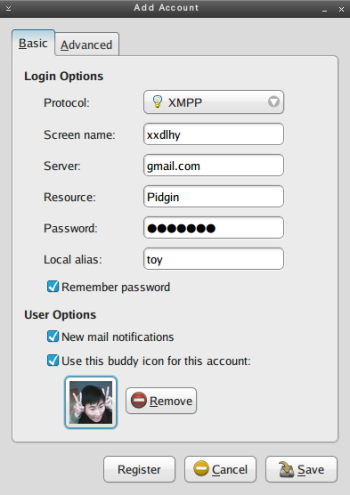
在 Pidgin 中添加新的帐号时,就会打开“Add Account”对话框。为了能够与 Google Talk 连接,其设置要点如下:

  1. 在基本标签页:
    • Protocol:选择 XMPP
    • Screen name:填写 Gmail 帐号 @ 之前的内容
    • Server:填写 gmail.com
    • Resource:Pidgin
    • Password:填写 Gmail 帐号的密码
    Pidgin
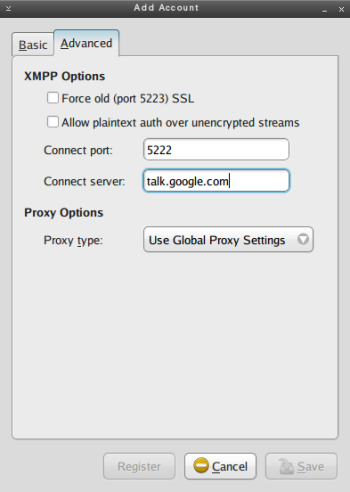
  2. 切换到高级标签页:
    • Connect port:默认是 5222
    • Connect server:填入 talk.google.com
    Pidgin

Read More:

12 Comments

  1. 1 Vinny Commented @ 2007-05-05 22:08Reply to this comment

    有些公司5222端口不开放,则可以使用443端口。 同时选中Force old SSL和Allow plaintext auth over unencrypted streams两个选项,其他设置不变。

  2. 2 jay Commented @ 2007-05-05 22:11Reply to this comment

    http://www.getdeb.net/release.php?id=817

    ubuntu 的包出来了~~

  3. 3 bbbush Commented @ 2007-05-05 22:34Reply to this comment

    我这边只填了用户名和服务器,没有填高级选项,一样可以连接呀。 fedora 7。

  4. 4 ◎~◎&#~# Commented @ 2007-05-05 22:59Reply to this comment

    QQ的设置服务器和端口都是什么阿??~~如何设置??

  5. 5 winsphinx Commented @ 2007-05-06 10:30Reply to this comment

    多谢多谢 安装后一直在找jabber协议,后来总算在xmpp下设置成功 博主此文可以帮助别人少走弯路

  6. 6 Toy Commented @ 2007-05-06 19:04Reply to this comment

    @bbbush:真是不填也可以的。

    @4 楼:不用管它。

  7. 7 阳春面 Commented @ 2007-05-06 21:15Reply to this comment

    原来Pidgin就是Gaim啊... 刚才还在奇怪怎么多个新IM呢

  8. 8 zicjin Commented @ 2007-05-13 17:31Reply to this comment

    请教一下你用的系统主题是什么名称? 很漂亮啊,我也想用。 不会用的是linux吧?

  9. 9 Toy Commented @ 2007-05-13 17:56Reply to this comment

    @zicjin:正是 Linux。其主题为 Trace (Fluxbox) + Aurora (GTK+)。

  10. 10 xcwen Commented @ 2007-10-08 20:12Reply to this comment

    谢谢, 有些公司5222端口不开放,则可以使用443端口。 同时选中Force old SSL和Allow plaintext auth over unencrypted streams两个选项,其他设置不变。 我的这边就是这个样的。。

  11. 11 Caspar Ant » Blog Archive » 端口……囧一下宏福的端口 Pingbacked @ 2008-03-04 17:24Reply to this comment

    [...] http://linuxtoy.org/archives/configure-pidgin-for-google-talk.html [...]

  12. 12 王永杰的Blog(博客) » 用 pidgin(gaim) 上 Gtalk 和 MSN Pingbacked @ 2008-06-30 15:35Reply to this comment

    [...] 参考:Pidgin 连接 Google Talk 的配置 Posted by 王永杰 in 技术为本, 网络应用 19 03月 [...]