LinuxTOY 是一个致力于提供 Linux 相关资讯的专题站点。如果您发现了好用好玩的 Linux 东东并愿意发扬自由、分享的精神,可以点击顶部导航 Contact 按钮进行投稿。

Related entries

  • No related posts

CDargs:拯救你的手指

[撰文/hmy]

CDargs 给目录做书签,在很深的目录之间切换就非常之方便了,知道这个工具很久,但是一直没去用,刚看文档用了一下,非常不错。
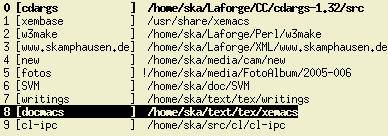
CDargs

首先是给目录做好标签,然后用 cdb bookmarks 就行了。另外假如你在 /usr/share/doc 下,你输入 ca doc 就做好了一个书签。然后输入 cdb doc 就进入 /usr/share/doc 目录了。

更详细的内容参考 manpage 和这个文档 http://www.linux.com/feature/114073

署名 • 注明出处 • 非商业性使用

18 Comments

  1. 1 希罗 Commented @ 2008-09-19 4:56 pmReply to this comment

    学习了。
    我用的是
    alias cddoc=’cd /usr/share/doc’

  2. 2 hmy Commented @ 2008-09-19 5:21 pmReply to this comment

    alias方法,遇到copy或者mv就有点麻烦,其实可以定义变量也行
    export doc=”/usr/share/doc”
    cd $doc

  3. 3 liufeng Commented @ 2008-09-19 8:32 pmReply to this comment

    复制链接指向的目录的话可以在cp后面加-L参数。

  4. 4 est Commented @ 2008-09-19 9:42 pmReply to this comment

    跟你们说了不成批使用命令行的话效率非常低,还不信。偏偏要成天ls, cd, clear来装B

    来一个问题,文件名杂乱无章的20个文件,要按文件创建时间选择偶数个复制到另外一个目录怎么办?

    Windows下我用鼠标花一些时间点击就行了。虽然麻烦但是不用专门去学习一大堆狗屎微语言的恶心语法。

  5. 5 普林斯赖 Commented @ 2008-09-19 10:24 pmReply to this comment

    @est
    Linux下面不是也能这样用鼠标点么……

  6. 6 SecretZero Commented @ 2008-09-19 10:41 pmReply to this comment

    用资源管理器,右键启动终端。

  7. 7 vlinux Commented @ 2008-09-20 1:38 amReply to this comment

    est说话很难听

    这个功能我在系统上线的时候很有用,收藏了。不是什么时候都能使用图形界面的。

  8. 8 latteye Commented @ 2008-09-20 4:51 amReply to this comment

    CDPATH 环境变量 也能解决一些问题。

  9. 9 galeki Commented @ 2008-09-20 7:22 amReply to this comment

    该用命令用命令,该用鼠标用鼠标,咋搞得跟入党派似的……

  10. 10 AskiTeng Commented @ 2008-09-20 9:01 amReply to this comment

    @est

    哦~~ 你”聽”起來很內行哦

    這文章是給大家介紹軟件參考、討論。沒必要裝牛吧…

  11. 11 lxlxdw Commented @ 2008-09-20 9:42 amReply to this comment

    我在想shell下面能否有快捷键映射 那样就可以更方便目录跳转之类的繁琐操作了

  12. 12 tommy Commented @ 2008-09-20 7:05 pmReply to this comment

    @est
    这种事情倒是很少干,万一要这样做,数量少可以用mc,数量大还是用命令行方便。ls -t | sed “1~2d”就可以得到所有偶数文件名了,根据要进行的处理,用一下xargs或用while就可以了。比一个一个点更方便,如果文件数上了几十,用资源管理器来一个个简直是恶梦,一不小心,control没按住,就要从头来开始。

    如果确实不喜欢命令行,gnome之类都提供了和windows类似的使用方式,但也没必要这样说吧?

  13. 13 ginkgo Commented @ 2008-09-20 10:53 pmReply to this comment

    @tommy
    主要是在windows下用惯了,有不肯花时间学习简单的语法。其实花时间学习一下,效率会提高很多。

  14. 14 rainy Commented @ 2008-09-21 6:15 pmReply to this comment

    如果文件是20000个,你也用鼠标点?

  15. 15 lovelywcm Commented @ 2008-09-21 10:26 pmReply to this comment

    cda(){ cdargs -a=:$1:`pwd`; }
    cdb(){ cdargs “$1″ && cd “`cat “~/.cdargsresult”`”; }

    :/usr/share/doc$ cda doc
    added :doc:/usr/share/doc
    :/usr/share/doc$ cd
    :~$ cdb doc
    :/usr/share/doc$ echo “It Is Very Shuang :)”

  16. 16 MJ Commented @ 2008-09-22 10:48 amReply to this comment

    softlink

  17. 17 passenger Commented @ 2008-09-22 1:08 pmReply to this comment

    @est
    来一个问题,文件名杂乱无章的20000个文件,要按文件创建时间选择偶数个复制到另外一个目录怎么办?

    Windows下用鼠标花多少时间来点击才行?

  18. 18 GunsNRose Commented @ 2008-10-17 2:23 pmReply to this comment

    cdargs 目前针对中文目录好像还是乱码
    我用的screen的状态栏也是乱码现像,不知道何时加入utf-8的支持