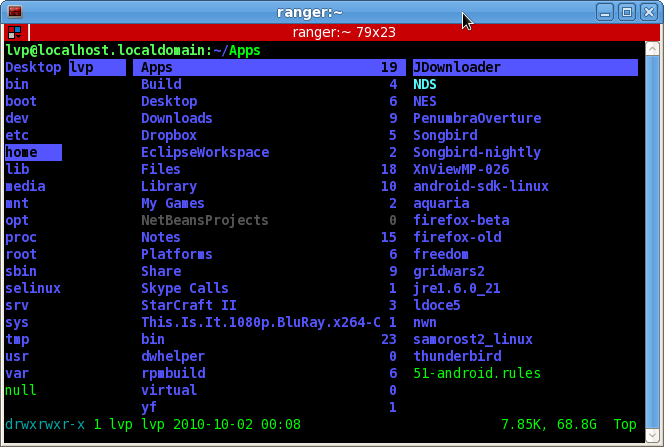
Ranger: 控制台下的文件管理器

Ranger 是一个控制台下的文件管理器。感谢 gDD 来稿!

Ranger 用 Python 完成,默认为使用 Vim 风格的按键绑定,比如 hjkl(上下左右),dd(剪切),yy(复制)等等。功能很全,扩展/可配置性也非常不错,介绍一下几个主要特点:

  • Vi 风格的按键绑定。
  • 类似MacOS X下Finder(文件管理器)的多列文件管理方式。
  • 支持多标签页。
  • 实时预览文本文件和目录。
  • 可以使用S键退出并转至最后浏览的目录。

另外man和帮助文档(主界面按“?”)也很完善,喜欢Vi风格的千万别错过了。

Arch Linux 用户可以通过 AUR/ranger-git 获取。

Fedora 用户可以通过 pkcon install ranger 安装。

另外 Vi 粉丝们也可以尝试基于 WebKit 引擎的浏览器:Vimprobable

Read More:

30 Comments

  1. 1 Iven Commented @ 2010-10-04 20:33Reply to this comment

    呃,本来看到命令行没想安,不过一看到 Arch 用户安装方法,还是安下试试吧……o(∩∩)o...哈哈

  2. 2 Meteor Liu Commented @ 2010-10-04 20:41Reply to this comment

    无图无真相

  3. 3 黑日白月 Commented @ 2010-10-04 21:00Reply to this comment

    @Meteor Liu:

    有图有真相了……

  4. 4 vern Commented @ 2010-10-04 21:01Reply to this comment

    非常喜欢 ranger,比起 vifm 显得更专业,特别是 m 标记和 ` 跳转功能。几乎不用任何配置都可以工作的很好。 Vimprobable 就不敢恭维了~~

  5. 5 gDD Commented @ 2010-10-04 21:01Reply to this comment

    官方网站有一张截图:http://savannah.nongnu.org/projects/ranger/ 另外h和l是用来前进后退的。。。 建议用xset改进键盘延时和重复速率:

    200 is delay in ms and 30 is rate

    xset r rate 200 30

  6. 6 Iven Commented @ 2010-10-04 21:02Reply to this comment

    试用了一下,确实很不错,尤其文件预览很贴心,虽然不支持高亮……留着以后系统出故障的时候用吧……

  7. 7 gDD Commented @ 2010-10-04 21:03Reply to this comment

    呃,没想到两个井号会把字体变得这么大。。。

  8. 8 黑日白月 Commented @ 2010-10-04 21:15Reply to this comment

    @gDD:

    汗……之前忘署名稿源了,不好意思~

  9. 9 ab Commented @ 2010-10-04 21:37Reply to this comment

    即使我平时都用dolphin,也不得不说:it's so cool!

  10. 10 gDD Commented @ 2010-10-04 22:09Reply to this comment

    @黑日白月: :) PS:帮忙把5楼的大号字体改一下吧,本来应该是注释的,结果被“Markdown”了。

  11. 11 transtone Commented @ 2010-10-04 22:23Reply to this comment

    和mc比有啥子异同?

  12. 12 黑日白月 Commented @ 2010-10-04 23:05Reply to this comment

    @gDD:

    这个……偶改不成滴……

    话说 WordPress 的这个 markdown 插件真是让人又爱又恨……

  13. 13 vern Commented @ 2010-10-04 23:19Reply to this comment

    竟然还支持标签页,你支持标签页也就算了,还xx的默认支持 Alt-n 快捷键切换,靠。丫的再支持键绑定还不无敌了?

  14. 14 cobranail Commented @ 2010-10-04 23:26Reply to this comment

    像是midnight commander的缩水版

  15. 15 lilydjwg Commented @ 2010-10-04 23:55Reply to this comment

    和 VimExplorer (http://www.vim.org/scripts/script.php?script_id=1950) 相比如何?

  16. 16 lun Commented @ 2010-10-05 9:11Reply to this comment

    @vern: 明明支持键绑定

  17. 17 chi Commented @ 2010-10-05 10:05Reply to this comment

    这个太给力了,比vifm用着舒服多了。

  18. 18 ebird Commented @ 2010-10-05 11:14Reply to this comment

    早已习惯mc~

  19. 19 OSMSG Commented @ 2010-10-06 12:51Reply to this comment

    嘿嘿 刚刚看到pkcon的时候一愣阿。。。 都忘了fedora里面有一个可以与yum想媲美的东西了

  20. 20 yaroot Commented @ 2010-10-06 17:02Reply to this comment

    @transtone: 比mc轻, 我觉得比mc给力点(也没怎么用过mc, 我不太用fm), 推荐试试... 八卦下作者也用archlinux

  21. 21 ibex Commented @ 2010-10-08 15:57Reply to this comment

    貌似还支持修改默认应用程序,无意中发现也支持鼠标。感觉就是~妖孽啊……

  22. 22 cascader Commented @ 2010-10-09 20:52Reply to this comment

    好东西~~ 哪位好心人赞助个 deb 包吧

  23. 23 feng Commented @ 2010-10-11 14:09Reply to this comment

    非常不错,使用感觉很好。

  24. 24 warboss Commented @ 2010-10-15 9:56Reply to this comment

    在ubuntu10.04上装以后,运行,提示: File "/usr/local/lib/python2.6/dist-packages/ranger/core/loader.py", line 21, in from ranger.ext.signals import SignalDispatcher ImportError: No module named signals

    谁知道 该装哪个module?

  25. 25 adam8157 Commented @ 2010-10-20 19:01Reply to this comment

    棒...强烈推荐键盘流和vi流使用, 平铺窗口管理器最佳搭配.

  26. 26 lee Commented @ 2010-11-26 19:19Reply to this comment

    用emacs,里面有个dired,好像和这个挺像的

  27. 27 Adaptee Commented @ 2010-12-31 14:04Reply to this comment

    现在支持incremental search了,更像vim了,哈哈

  28. 28 zach Commented @ 2011-04-20 19:58Reply to this comment

    @Iven: ranger是可以支持高亮的,各种preview,看看http://ranger.nongnu.org/ 就知道了。

  29. 29 stardiviner Commented @ 2011-09-22 14:19Reply to this comment

    请问怎么设置才能让ranger不会中文乱码?我的终端其他都是中文显示正常。只有ranger会乱码。

  30. 30 adaptee Commented @ 2011-09-22 16:41Reply to this comment

    zh_CN.UTF-8 locale下,ranger中中文显示没遇到过问题